OG Image Sizes, Specs, and the One Mistake That Breaks Every Preview
Get the dimensions wrong and your link preview will be cropped, stretched, or blank. Here are the exact specs for every major platform in 2026 — with visual guides.
March 14, 2026
Want beautiful link previews automatically?
ShareMagic generates branded OG images from your page's metadata — no design work required.
Try ShareMagic free →Getting Open Graph images right comes down to the details. The wrong dimensions, file size, or image format can silently break previews across every platform your users share links on. Here are the exact specs — with visual guides so you can see exactly what you’re designing for.
The Universal OG Image Spec
If you only remember one number, make it 1200×630. That’s the canonical OG image size — 1200 pixels wide, 630 pixels tall, a 1.91:1 aspect ratio.
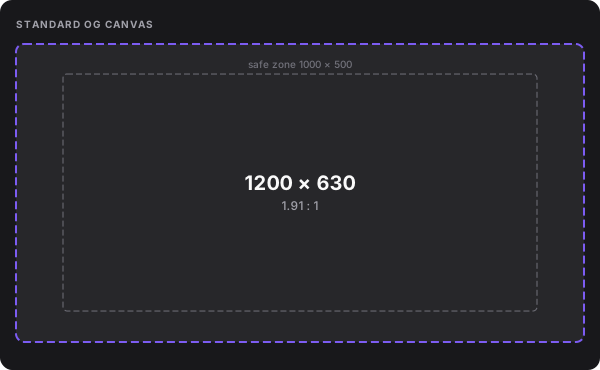
This size works across Facebook, LinkedIn, iMessage, Slack, Discord, and most other platforms. Design for this canvas and you’ll cover 95% of use cases.
<meta property="og:image" content="https://yoursite.com/og/page.png" />
<meta property="og:image:width" content="1200" />
<meta property="og:image:height" content="630" />
The og:image:width and og:image:height tags are optional but recommended — declaring them lets crawlers skip an extra HTTP request to measure the image.
Platform Comparison
Each platform renders the same image slightly differently. Here’s what to know:
| Platform | Dimensions | Max Size | Notes |
|---|---|---|---|
| Facebook / Meta | 1200×630 | 8 MB | JPG, PNG. Caches aggressively. |
| 1200×627 min | 5 MB | Strictest platform — 1199 px wide = no preview. | |
| Twitter / X | 1200×628 | 5 MB |
Set twitter:card to summary_large_image for wide layout. |
| Slack / Discord / iMessage | 1200×630 | Varies | Follows OG spec. HTTPS required on all three. |
Safe Zone for Text
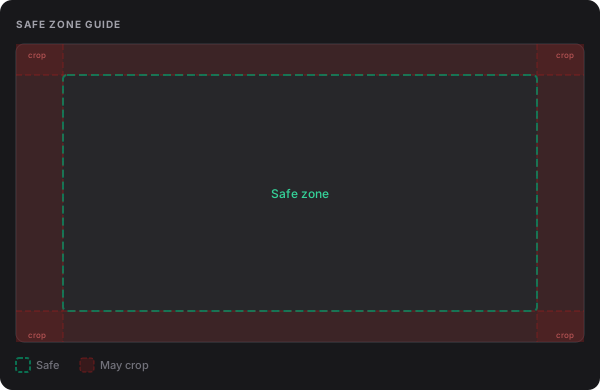
Platforms crop differently depending on context — a sidebar preview or mobile thread may show less. Keep text and logos within the 1000×500 safe zone (the inner 83% × 79% of the canvas).
The One Mistake That Breaks Everything
Using a relative URL for og:image. Crawlers fetching your page in isolation don’t know your domain. A relative path gives them nothing to work with.
<!-- ❌ This will fail on every platform -->

<meta property="og:image" content="/images/og.png" />

<!-- ✅ Always use the full absolute URL -->

<meta property="og:image" content="https://yoursite.com/images/og.png" />
File Format Recommendations
JPG is the safest default — small file sizes, universal support. Aim for 80% quality in your compression settings.
PNG is better for images with text, logos, or flat color. Text in a JPG often looks slightly muddy due to compression artifacts. If your OG image is a branded card with a title and logo, use PNG.
WebP is supported by Twitter and Discord but not universally. Don’t use it as your primary format.
GIF only shows the first frame. Animated previews aren’t supported on any major platform.
Generating Images at Scale
For a static site with a handful of pages, design OG images manually and call it done. For anything dynamic — blog posts, product listings, user profiles — you need automation.
ShareMagic handles this at the URL level. Set up a template once, and every page on your site gets a unique, branded OG image without any pipeline to maintain.
Keep reading
Why Nobody Makes OG Images at Scale (And What It's Actually Costing You)
You have hundreds of pages and one OG image. Here's why that keeps happening, why product photos don't cut it, and what it looks like when you fix it.
Why Your Links Look Broken Without OG Images (And How to Fix It)
That grey box showing up when you share your site? It's costing you clicks. Here's what's happening and how to fix it in minutes.